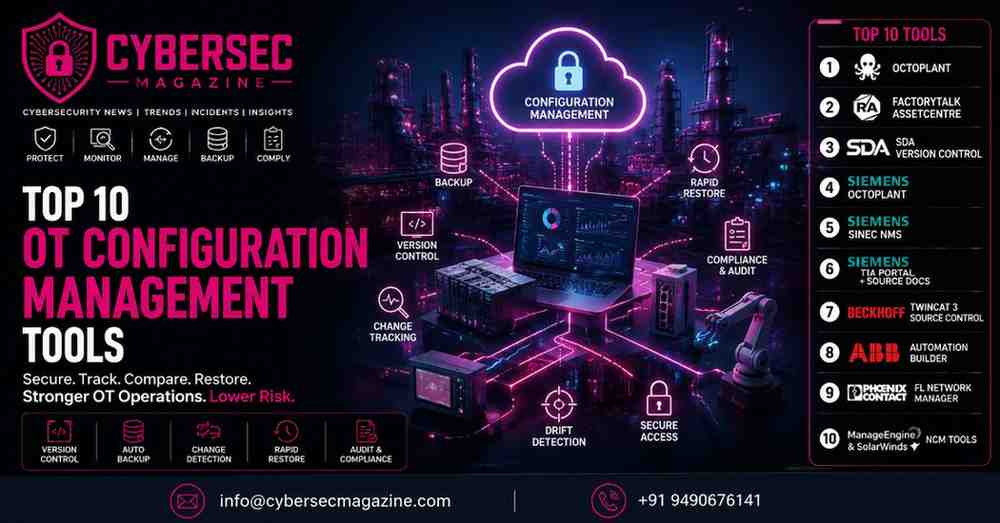
Top 10 OT Configuration Management Tools
In OT and ICS environments, configuration is not just a technical setting. It is part of operational continuity. A changed PLC program, a modified switch profile, a mismatched firmware version, or an untracked engineering workstation update can affect uptime, safety, and recovery in ways that are far more serious than in ordinary IT. NIST’s OT guidance specifically frames these systems around performance, reliability, and safety requirements, while ISA/IEC 62443 treats secure industrial operations as a lifecycle discipline rather than a one-time hardening exercise.
That is why OT configuration management has become a real security control. Today’s industrial teams need tools that can back up automation projects, compare versions, detect unauthorized changes, restore trusted states, and keep network and device configurations aligned across plants. Current vendor documentation from Octoplant, Rockwell Automation, Siemens, SDA, Beckhoff, ABB, Phoenix Contact, and major network-management vendors all point to the same shift: configuration management is now about resilience, auditability, and faster recovery, not just file storage.
Why OT configuration management matters now
Industrial environments are increasingly connected to enterprise IT, cloud analytics, vendor remote access, and distributed production sites. That expands the attack surface and makes drift much easier to miss. CISA’s OT guidance and NIST SP 800-82 both emphasize the need for careful OT security planning, while ISA/IEC 62443 stresses maintaining secure industrial systems over time. In practice, that means every untracked change can become a reliability issue or a security issue, and often both.
Good OT configuration management tools help teams answer four questions quickly: what changed, who changed it, when it changed, and how to get back to a trusted state. The best tools also help with backup scheduling, file comparison, firmware tracking, role-based approvals, and restoration workflows that are usable during an incident, not just during a test.
What to look for in a modern OT configuration management tool
A strong platform should support the assets you actually run, not just generic server or laptop configurations. In OT, that usually means PLCs, HMIs, drives, robots, SCADA systems, switches, routers, industrial firewalls, and engineering projects. It should also support controlled restore, configuration comparison, and traceability so changes can be reviewed and rolled back with confidence. Octoplant, FactoryTalk AssetCentre, and SINEC NMS all document these kinds of capabilities in current product material.
It also helps if the tool fits the way industrial teams work. Some plants need a purpose-built automation change-management suite. Others need PLC version control tied to source documents or Git-style workflows. Still others need network configuration management for OT switches and firewalls. That is why the list below mixes industrial automation platforms and OT-friendly network configuration tools.
The 10 best OT configuration management tools
1) Octoplant
Octoplant is one of the most established names in industrial configuration management. Its current documentation positions it as an industry standard for version control, data consistency, system visibility, industrial systems backup, change management, asset management, and regulatory compliance. The platform is designed to secure storage, tracking, and comparison of automation data across devices, lines, and entire plants, which makes it especially relevant for multi-site manufacturing.
For OT teams, the value is straightforward: Octoplant helps prevent unauthorized changes and speeds recovery when a controller, recipe, or automation project drifts from the approved baseline. If your environment needs centralized oversight for backups, version control, and change tracking across mixed industrial assets, this is one of the strongest starting points.
2) Rockwell Automation FactoryTalk AssetCentre
Rockwell Automation describes FactoryTalk AssetCentre as a centralized way to manage and track automation-related assets across the production environment. Rockwell’s training and implementation materials also say the platform is used to secure access to the control system, track user actions, manage asset configuration files, and provide backup and recovery of operating asset configurations.
That makes it a strong fit for Rockwell-heavy plants or mixed sites that need a more formal asset-and-change-management layer around automation systems. In practical terms, it helps reduce dependence on tribal knowledge and local files, which is a major weakness in many brownfield plants.
3) Software Defined Automation Version Control
SDA’s Version Control platform is built specifically for PLC code management in multi-vendor OT environments. Its current product page says it automates PLC code versioning, keeps the latest code accessible, tracks every change, and creates an auditable history. SDA also positions the platform as a way to keep automation secure while reducing the administrative burden on engineers.
This kind of tool is especially useful where engineers are still using project files, local backups, and manual naming conventions to manage logic changes. SDA is a strong option when you want browser-based access, centralized traceability, and a source-of-truth approach for PLC logic rather than scattered files on individual workstations.
4) Siemens octoplant
Siemens now offers octoplant in its portfolio and describes it as a trusted industry standard for version control and data consistency, with secure storage, tracking, comparison, and centralized project access. Siemens’ page also highlights lifecycle tracking and change detection for automation and engineering teams.
That is important in Siemens-centric plants because it gives teams a recognizable industrial workflow for comparing and restoring automation data without forcing them into general-purpose IT tooling. If your plant already relies heavily on Siemens engineering ecosystems, this can simplify adoption and governance.
5) Siemens SINEC NMS
SINEC NMS is Siemens’ industrial network management system, and its current backup documentation says it provides regular configuration backups, comparison functions, and restore capabilities for device configurations. Siemens also notes that backups can be created before and after upgrades and that configuration changes can be recognized quickly through regular backups.
This matters because many OT outages begin with a network-device change that was not tracked properly. SINEC NMS is a good choice when the configuration problem lives in the network layer rather than in a PLC project file, especially for environments with SCALANCE and related Siemens industrial networking hardware.
6) Siemens TIA Portal with SIMATIC Source Documents and Version Control Interface
Siemens’ TIA Portal ecosystem has become more friendly to modern source control. Siemens says SIMATIC Source Documents offer a way to export and import TIA Portal project data for processing in external systems, and its version-control interface documentation shows that TIA Portal can connect to external version control programs. Siemens also notes that SIMATIC Source Documents are available in newer TIA Portal versions as an easier bridge to modern version control workflows.
This is not a standalone OT backup appliance; it is an engineering workflow enabler. It is most useful when the organization wants Git-like traceability, structured collaboration, and change history inside a Siemens development process. For teams standardizing on controlled engineering revisions, it is one of the best current ways to bring version discipline into PLC development.
7) Beckhoff TwinCAT 3 Source Control
Beckhoff’s TwinCAT 3 Source Control documentation explains how PLC projects can be managed under source control, and the company recommends using the TwinCAT Project Compare Tool rather than manually merging files. Beckhoff also notes that its PLC Control creates a backup file on every save, which provides a simple recovery path for earlier states.
This makes Beckhoff attractive to teams that want engineering discipline built into the automation workflow rather than added afterward. It is especially relevant where developers and controls engineers are collaborating on TwinCAT projects and need reliable revision control without reinventing the process outside the engineering toolchain.
8) ABB Automation Builder
ABB says Automation Builder is an integrated software suite that lets users configure, program, and maintain complete automation systems in one environment. ABB also highlights integrated version control, side-by-side installation of multiple versions, and collaboration features such as flexible configuration support and product-line management.
For OT configuration management, that matters because engineering consistency is often broken by version mismatch and ad hoc project copies. ABB’s tooling is a strong fit when you want engineering, configuration, and collaboration in one place instead of scattered across different utilities and file shares.
9) Phoenix Contact FL Network Manager
Phoenix Contact’s FL Network Manager is a practical OT-friendly tool for device configuration backup and revision management. Its documentation says configuration files can be downloaded from multiple devices for backup, stored with IP address and timestamp, and quickly restored for device replacement or recovery. Phoenix Contact also positions the tool for industrial Ethernet switch management and fast commissioning.
This is a strong option when the configuration risk sits in the network layer, especially for plant floor switches and related connectivity equipment. In many plants, having a clean backup of switch configurations is the difference between a short maintenance issue and a long recovery event.
10) ManageEngine Network Configuration Manager and SolarWinds Network Configuration Manager
ManageEngine Network Configuration Manager is a multi-vendor network configuration and change-management solution for switches, routers, firewalls, and other devices, while SolarWinds Network Configuration Manager automates configuration management, compliance reporting, backup scheduling, and rollback support. Both tools are used more often in IT, but they are still highly relevant in OT networks where industrial switches, firewalls, and routing layers need disciplined configuration control.
These platforms are especially useful in hybrid environments where OT networking shares governance with enterprise networking. They are not replacements for PLC-specific version control, but they are excellent for the infrastructure layer that keeps OT connectivity stable and auditable.
How to choose the right OT configuration management tool
If your biggest problem is PLC logic drift, start with a platform built for automation project versioning, such as Octoplant, FactoryTalk AssetCentre, SDA, Siemens TIA Portal workflows, Beckhoff source control, or ABB Automation Builder. If your biggest issue is switch and firewall consistency, the network-focused tools from Siemens, Phoenix Contact, ManageEngine, or SolarWinds may be the better fit. That is an inference based on the documented product scopes above, not a universal rule.
The best way to evaluate these tools is to ask whether they can show you a trustworthy baseline, detect unauthorized change, and restore a known-good configuration quickly. That aligns with NIST’s OT guidance, ISA/IEC 62443’s lifecycle approach, and CISA’s broader OT security direction.
Final thoughts
OT configuration management has moved from a maintenance task to a resilience requirement. In environments where a single bad change can affect production quality, uptime, or even safety, the right tool is one that gives you version control, comparison, auditability, and rapid recovery in a form engineers will actually use.